UMS Web API: Difference between revisions
| Line 20: | Line 20: | ||
==== Software requirements : ==== | ==== Software requirements : ==== | ||
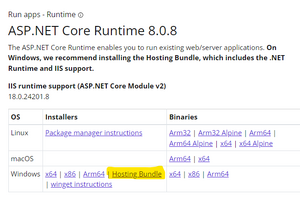
* ASP.Net Core Runtime '''Hosting Bundle''' - https://dotnet.microsoft.com/en-us/download/dotnet/ | * ASP.Net Core Runtime '''Hosting Bundle''' - https://dotnet.microsoft.com/en-us/download/dotnet/9.0 | ||
* [[File:.Net Hosting Bundle.png|alt=.Net Hosting Bundle download|frameless]] | * [[File:.Net Hosting Bundle.png|alt=.Net Hosting Bundle download|frameless]] | ||
Revision as of 12:55, 27 November 2024
Description
UMS Web API opens up for exporting data from UMS system via API. Therefore it is not limited to a certain supplier.
You as customer can control data-source and access to the API, and the supplier can via the build-in swagger configurate their API connection.
Prerequisites and needed modules
Purchase requirements :
- UMS Web API module
Technical requirements :
- 1 x MS SQL database (additional to the existing UMS Database)
- 1 x IIS Web server (existing UMS Web server can be used to host API site) - module Websocket Protocol must be enabled on IIS for site to work
- 1 x SSL Certificate for the API Site (eg. umswebapi.yourdomain.dk)
- Internal and External DNS record to access site from Internet
Software requirements :
- ASP.Net Core Runtime Hosting Bundle - https://dotnet.microsoft.com/en-us/download/dotnet/9.0

Installation
Create a new site on IIS server. Name it accordingly (e.g umswebapi.yourdomain.dk)
Add SSL Certificate to site (encrypted transmissions)
Create DNS record(s) (internal / external)
Download latest version of the Web.API.installer file here : downloads.inlogic.dk - /downloads/Products/Web.Api/
Install application on IIS server
Restart IIS
Configuration
Go to UMS Web API URL in browser (e.g umswebapi.yourdomain.dk)
Create SuperAdmin user @ 1. logon
Insert connection string to UMS Web API database (e.g Server=[myServerAddress];Database=[myDataBase];Username=[sql-username];Trusted_Connection=True/False;TrustServerCertificate=Yes;)
to be continued ...