|
|
| Line 6: |
Line 6: |
|
| |
|
| ===Admin servers=== | | ===Admin servers=== |
| Choose the admin server created here [[AdminServers/scrive|Adminservers/Scrive]] | | Choose the admin server created here [[AdminServers/DigitalPost|Adminservers/DigitalPost]] |
|
| |
|
| ===Providers=== | | ===Providers=== |
| This will created/update and delete groups.
| |
|
| |
| It will also add users and remove them again.
| |
|
| |
| These groups can be used to add security to users based on group membership.
| |
|
| |
| ==== MitID ====
| |
| This opens up for using private MitID as login for UMS
| |
|
| |
| ==== MitID Erhverv ====
| |
| This opens up for using MitID Erhverv as login for UMS
| |
|
| |
| ==== Restrict MitID login to password change ====
| |
| Setting this option restricts the features after web login to only be able to reset their own password.
| |
|
| |
| After resetting password the user can logout and then choose another login option to get access to the full feature set.
| |
|
| |
|
| ==FAQ== | | ==FAQ== |
| Q : I have SSO enabled with on my UMS and MEA APP
| |
|
| |
| A: You need to remove "force" from SSO setting and possibly AuthForms in order to view MitID as login option.
| |
Revision as of 10:41, 26 March 2026
UMS Configurator settings
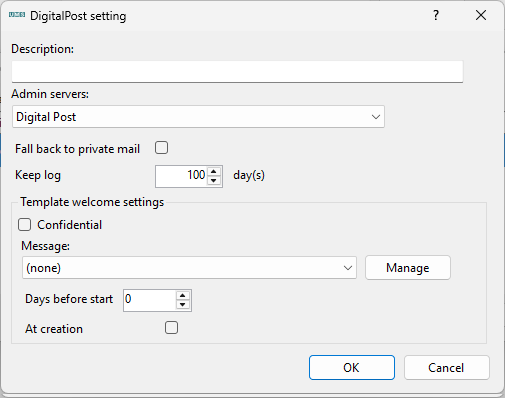
Description
Insert a name or description for the setting
Admin servers
Choose the admin server created here Adminservers/DigitalPost
Providers
FAQ
